Voice AI engineering
Vapi vs Retell vs LiveKit vs Pipecat: which voice AI stack fits?
Compare Vapi, Retell, LiveKit, and Pipecat by control, telephony, deployment, testing, and team fit before choosing a production voice AI stack.

Run your own voice AI platform bake-off
Compare candidates on hard gates, evidence, operating ownership, cost, exit risk, and the workflow your team actually needs to run.
voice-ai-platform-bakeoff-scorecard.csv
You have a voice-agent pilot to ship, a phone workflow to connect, and four tabs open: Vapi, Retell, LiveKit, and Pipecat. Every option can get audio into a model and a response back to a caller. That does not make them interchangeable.
The decision is really about ownership. Do you want a managed voice-agent product that removes infrastructure choices, or a framework that gives your engineers direct control over media, orchestration, and deployment? This guide compares the four stacks using the same fictional appointment-rescheduling workflow. You will leave with a shortlist based on your team and risk, not a generic winner.
The short answer
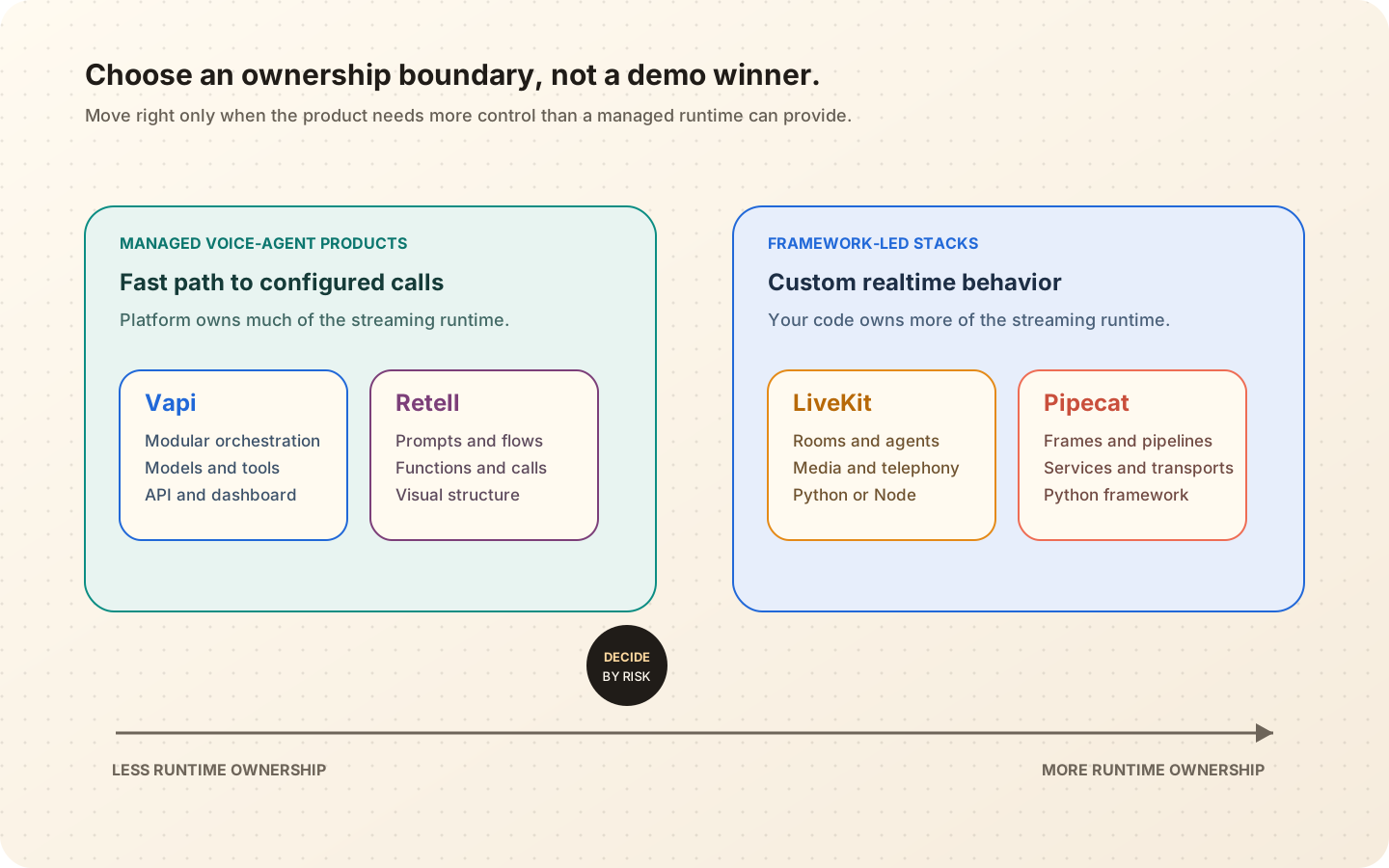
Choose Vapi or Retell when speed to a managed phone agent matters more than owning every runtime layer. Choose LiveKit or Pipecat when your product depends on custom realtime behavior and your team is prepared to operate more of the stack.
Within those pairs, the split is less tidy. Vapi presents a modular managed orchestration layer around transcriber, model, and voice choices. Retell offers prompt-driven agents and visual conversation flows with built-in call functions. LiveKit combines a realtime media platform, an agent framework, telephony, and optional managed cloud services. Pipecat is a Python framework built around ordered pipelines, processors, frames, transports, and model services, with both self-hosting and Pipecat Cloud paths.
That description is current as of July 14, 2026. Capabilities change quickly, so verify the linked official docs before signing a contract or fixing an architecture.
Start with the ownership boundary
Teams often compare voices, model menus, and per-minute prices first. Those details matter, but they change faster than the operating model underneath them.
Ask a more durable question: where does your application end and the platform begin?
With a managed platform, you configure an agent, connect tools, attach a phone number or telephony route, and consume the platform’s call events. The platform owns much of the streaming runtime and the glue between speech recognition, model inference, synthesis, and call control.
With a framework-led stack, that glue is application code. You can change it. You also have to debug, deploy, scale, observe, and secure it.
Neither choice is automatically more production-ready. A managed runtime can reduce operational burden while constraining an unusual interaction. A framework can express that interaction while giving your team more ways to create a fragile system.
Scroll diagram horizontally on smaller screens.
A fair comparison needs one workflow
Consider this fictional example, not a Voxeval customer story.
A clinic wants callers to move an existing appointment. The agent must identify the caller using the clinic’s approved process, read available slots, confirm the new time, update the scheduling system, send a message, and transfer the call when identity or booking rules cannot be satisfied.
The happy path is easy to demo. The stack decision shows up in the awkward paths:
- The caller switches from a mobile connection to speakerphone in a noisy room.
- “Friday at four” changes to “Thursday before four” during confirmation.
- The booking request times out after the old slot is released.
- The caller interrupts while the agent is reading a disclosure.
- The human queue is closed.
Use those paths when comparing platforms. A five-minute setup video answers “can it speak?” It does not answer “can our team control and verify this workflow?”
Vapi: managed orchestration with a modular model stack
Vapi’s official documentation describes the platform as an orchestration layer around three core modules: a transcriber, a model, and a voice. Its assistant quickstart covers creating an assistant, attaching a phone number, making calls, and adding tools. The tools layer includes built-in call-control functions plus webhook-based custom tools and hosted code tools.
That shape fits teams that want a managed calling runtime while keeping provider choice at the speech and model layers. You can start in a dashboard and move configuration into an API or CLI as the project matures.
For the fictional clinic, the team would configure the assistant, attach its scheduling functions, connect the approved phone route, and receive call artifacts and events from Vapi. The application still owns the business rules behind each function. Vapi calling your booking endpoint does not make a partial reschedule transaction safe.
Vapi is a strong shortlist candidate when
- A small engineering team wants to reach a phone or web call quickly.
- Swapping speech, language, or voice providers is part of the expected tuning loop.
- Webhook tools fit the backend integration model.
- The team prefers managed orchestration over operating the realtime loop.
Look more closely when
- The product needs custom media processing or unusual turn-control logic.
- A regulated workflow requires a specific data path, retention model, or vendor agreement.
- Tool execution needs transaction semantics that a simple request-and-response integration can hide.
- You need evidence that a particular model and telephony combination works in your regions and languages.
Vapi’s published ideal latency ranges are product guidance, not proof of your deployed path. Measure the full call with your models, tools, network routes, and caller conditions.
Retell: managed agents with prompt and conversation-flow options
Retell’s current docs expose several ways to structure an agent. A team can use single or multi-prompt agents, or build a visual conversation flow with nodes for dialogue, functions, transfers, code, and transitions. Its function system covers actions such as booking, SMS, call transfer, custom APIs, and inline code.
That makes Retell attractive when operations, product, and engineering teams want to inspect a call flow together. A structured flow can make key states visible without forcing every branch into one system prompt.
For the fictional clinic, identity checks, slot lookup, confirmation, booking, messaging, and transfer recovery could become explicit nodes and edges. That visibility is useful. It does not remove nondeterminism inside conversational nodes or prove that a transition fired for the right reason.
Retell is a strong shortlist candidate when
- The team wants a managed voice platform with visible workflow states.
- Product or operations partners need to review conversation structure in a visual builder.
- Built-in call functions and telephony paths cover much of the use case.
- Agent versioning and post-call review need to live near the configuration surface.
Look more closely when
- The workflow will be managed as code and must fit an existing software release system.
- Your telephony setup changes which transfer features the platform can control.
- The team needs custom media transforms or runtime behavior below the conversation layer.
- A visual graph could create false confidence around probabilistic transitions.
Retell’s custom-telephony documentation is a good example of why integration details matter. Some call-control behavior shifts back to your application when the platform does not control the telephony route. Test the exact route you plan to use.
LiveKit: realtime media infrastructure plus an agent framework
LiveKit Agents lets a Python or Node.js program join a LiveKit room as a realtime participant. The official quickstart supports both cascaded speech-to-text, language-model, and text-to-speech pipelines and direct realtime models. LiveKit also provides SIP telephony, web and mobile SDKs, deployment on LiveKit Cloud, and an open-source server that can be self-hosted.
The important difference is that the agent is application code running inside a realtime media system. Your team can shape session state, tools, participant behavior, handoffs, and model plugins directly.
For the fictional clinic, that control could support a custom identity task, explicit transaction state, region-specific media routing, and a warm-transfer workflow that briefs a human before connecting the caller. It also means your engineers own the lifecycle of those components.
LiveKit’s current testing helpers run agent behavior in text mode with Python or Node test frameworks. The docs clearly separate those lower-cost behavior checks from third-party end-to-end audio testing. That boundary is healthy: text tests can catch prompt and tool regressions, but they cannot prove audio timing, telephony, or barge-in behavior.
LiveKit is a strong shortlist candidate when
- Realtime media is a core product capability, not only a phone integration.
- The team wants Python or Node.js application code and a broad client SDK surface.
- Custom session, participant, telephony, or handoff behavior matters.
- Managed cloud and self-hosted infrastructure both need to remain possible.
Look more closely when
- The team wants a dashboard-first agent and does not want to operate application workers.
- The use case can be met by a managed call flow with less custom code.
- Engineers are underestimating media, SIP, deployment, and observability work.
- The test plan stops at LiveKit’s text-mode helpers.
LiveKit gives you control. It does not give you a free pass on system design.
Pipecat: an open-source pipeline for custom voice applications
Pipecat is an open-source Python framework for realtime voice and multimodal agents. Its core abstraction is a pipeline of frame processors. A typical pipeline moves audio from a transport through speech recognition, context aggregation, a language model, speech synthesis, and back to the transport. Pipecat Cloud offers a managed deployment path, while the framework can also run on infrastructure you control.
That explicit dataflow is useful when a team wants to insert custom processors, change providers, observe frames, or build behavior that does not fit a hosted agent configuration.
For the fictional clinic, engineers could add processors for language detection, protected-data handling, custom timing, audit events, and transaction state. They could choose a web transport for testing and a telephony transport for calls. Every added processor also becomes part of the failure surface.
Pipecat is a strong shortlist candidate when
- The engineering team prefers Python and wants an explicit streaming pipeline.
- Provider portability and custom processors are central requirements.
- The product needs control over how audio, text, context, and events move.
- Self-hosting or a framework-first cloud deployment is part of the plan.
Look more closely when
- The team wants a mostly configured, managed phone-agent product.
- Python is a poor fit for the existing runtime and operating model.
- Customization is being chosen for its own sake rather than a real product need.
- No one owns scaling, transport behavior, trace design, and failure recovery.
Pipecat makes the pipeline legible. Your team still has to make it reliable.
Comparison table: what your team is choosing
| Decision area | Vapi | Retell | LiveKit | Pipecat |
|---|---|---|---|---|
| Primary shape | Managed voice-agent orchestration | Managed voice agents and conversation flows | Realtime media platform plus agent framework | Open-source Python pipeline framework |
| Fast starting path | Dashboard, API, SDK, phone or web call | Dashboard, prompts or flow builder, telephony | Python or Node starter, Cloud or self-hosted server | Python quickstart, Pipecat Cloud or self-hosted |
| Runtime control | Platform-managed with configurable models and tools | Platform-managed with configurable flows and functions | Application code controls agent behavior in realtime rooms | Application code controls ordered frame processing |
| Telephony | Managed numbers and imported provider routes | Retell telephony and custom telephony paths | SIP telephony integrated with LiveKit rooms | Transport integrations chosen by the application |
| Best fit | Teams prioritizing fast managed orchestration | Teams wanting managed calls with visible conversation structure | Teams building custom realtime products across phone, web, or apps | Python teams building custom provider-flexible pipelines |
| Main responsibility to plan for | Backend tool safety and platform constraints | Flow correctness, telephony boundaries, and probabilistic transitions | Worker, media, session, deployment, and observability design | Pipeline, transport, deployment, scaling, and observability design |
This table describes product shape, not quality. It does not rank voice naturalness, latency, accuracy, reliability, cost, or compliance. Those require a dated test on your own workflow.
Run a two-day bake-off before choosing
Do not build four complete pilots. Build the smallest comparable slice that can expose your deciding risks.
Day one: the same happy path
Use one prompt, one caller persona, one speech and voice configuration where the platforms allow it, one booking sandbox, and one telephony route per candidate. Record every difference you cannot hold constant.
Measure setup time, first-audio timing, critical-entity accuracy, tool arguments, final booking state, traces, and the work needed to reproduce the configuration.
Day two: five failure paths
Run a correction, a tool timeout, a duplicate retry, an interruption during confirmation, and an unavailable human queue. Repeat each case. Keep the audio, event timeline, tool logs, and final state.
Then score two things separately:
- Caller and business behavior: Did the workflow finish safely and understandably?
- Team operability: Could your engineers explain, reproduce, and fix the failure?
The second score often breaks a tie. A platform that looks elegant in a clean demo may be hard for your team to debug. A framework that feels powerful may demand more on-call expertise than the workflow deserves.
Our opinionated selection rule
Start with the least ownership that can express your differentiator.
If your value is the business workflow and a managed platform can express it safely, do not create a media infrastructure project. Put the engineering energy into tool contracts, policy, evals, and customer experience.
If your value depends on custom realtime behavior, a unique client experience, private deployment, or deep control over the media loop, do not force it into a configuration surface that fights you. Accept the operational work and staff it honestly.
Do not choose based on one synthetic voice or a provider’s fastest demo. The ten-metric voice-agent scorecard gives you a fairer comparison method. The full-duplex evaluation guide helps when interruption and overlap are deciding features.
Where Voxeval fits
Voxeval is platform-neutral by design. The same workflow should be testable when your team changes a prompt, model, voice, telephony route, orchestration platform, or framework. That lets an architecture bake-off compare evidence instead of four different demo scripts.
The practical goal is not to crown Vapi, Retell, LiveKit, or Pipecat. It is to choose the ownership boundary your team can operate, then keep that choice replaceable with a versioned evaluation suite.
Common questions
Is Vapi better than Retell?
Not in the abstract. Vapi’s modular managed orchestration may fit a team that wants provider choice and API-led configuration. Retell’s prompt and conversation-flow options may fit a team that wants more workflow structure in a managed product. Test the same business and failure paths on both.
Is LiveKit a direct alternative to Vapi or Retell?
It can solve overlapping voice-agent use cases, but the ownership model differs. LiveKit is a realtime platform and agent framework, so application engineers control more of the runtime. Vapi and Retell expose more of the experience as a managed voice-agent product.
What is the main difference between LiveKit and Pipecat?
LiveKit centers a realtime room and participant model with agents, telephony, client SDKs, and cloud services. Pipecat centers a Python pipeline of frames, processors, services, and transports. Both allow deep customization, but their abstractions and operating ecosystems differ.
Should price decide the platform?
Price belongs in the decision, but compare the full cost of the tested configuration. Include telephony, speech and model providers, platform fees, hosting, observability, engineering time, support, failed calls, and human fallback. Date the comparison because pricing changes.
Reference list